
WorkBuddy frames the all-in-one office tool as a choice about what software may do to a computer, rather than a contest over supported file formats. woshipm describes three modes. Ask can inspect files without changing them. Plan prepares an execution plan before changes. Agent represents a more autonomous model. The same account says Craft can operate files directly, from folder organization to document generation. It can also handle presentations. It supports spreadsheets. Its selected working directory also sets the default place to read and save files.
UPDF takes a narrower path. iplaysoft identifies it as an AI PDF editor and reader across Windows and macOS. It is also available on iOS. Android and the web are supported as well. The useful comparison is autonomy. It also concerns file location and document control-not an inflated feature count.
Three products, three execution models
WorkBuddy frames office work as a question of how much control to hand a desktop agent. According to woshipm, Plan mode is one of its three modes. Ask mode can inspect files and answer questions without changing the computer. Agent mode is another mode. Plan mode can inspect files too, but produces a detailed execution plan before changes begin. That makes review part of the execution model.
The same woshipm account describes Craft mode as the setting that directly operates files.
In that mode, WorkBuddy can organize folders and generate documents. It can also create PowerPoint presentations or process spreadsheets. A selected working directory becomes its default place to read source files and save generated output. The attraction is not a long format checklist; it is the ability to move through a computer task rather than merely edit one document.
UPDF takes a narrower, document-centered approach. iplaysoft describes it as an AI PDF editor and reader for Windows and macOS. It also supports iOS. Android is supported as well, along with the web. Its features include editing, conversion, annotation, OCR, form signing, document comparison, AI summarization, and translation. Its cloud service automatically synchronizes files among computers. It also synchronizes files with tablets and mobile phones. Choose this model when the PDF is the center of the job and collaboration follows the document.
Yingxun Batch Processing Tool (鹰迅批量处理工具) represents a local transformation model. appinn says it works after installation without login or registration, processes files locally without an internet connection or server upload, and supports batch processing across its integrated categories. Those categories include Word tools. They also include Excel tools, PPT tools, PDF tools, text-file tools, and image tools. It suits repeatable conversions and edits where predictable local execution matters more than an agent operating the broader workflow.
Three models of "all-in-one" office software: PDF suite, batch processor, and desktop agent
| UPDF | Yingxun Batch Processing Tool | WorkBuddy | |
|---|---|---|---|
| Core approach | AI PDF editor and reader with PDF editing, conversion, annotation, OCR, signing, comparison, AI summarization, and translation | Local batch-processing toolbox for document, text-file, and image operations | Desktop office agent that can answer, plan, or directly operate files |
| Primary unit of work | PDF files and uploaded PDFs | Batches of files | Independent conversations treated as tasks with their own workspaces |
| Autonomy level | AI can summarize uploaded PDFs, generate analyses, translate, and assist with selected-text editing | Runs specified batch transformations | Craft mode can directly operate files; Plan mode prepares an execution plan before changes |
| Direct computer or file access | Can directly edit text, images, links, backgrounds, and watermarks in PDF files | Processes files locally | Full access allows access to all resource files and network operations on the user's computer |
| Non-executing or review-oriented option | Can compare two PDF files and automatically mark differences | not covered | Ask mode can view files and answer questions but does not modify anything on the computer |
| Planning before execution | not covered | not covered | Plan mode can list files to read, modifications, steps, validation methods, and risks before execution |
| Supported document scope | PDF editing and conversion to Word, Excel, PPT, images, HTML, and text | Word, Excel, PPT, PDF, text-file, and image tools | Document processing, data reporting, poster design, file organization, and imported skills |
| Batch processing | Page-management functions include merging, splitting, compressing, extracting, cropping, and replacing pages | Supports batch processing across its integrated tool categories and can add hundreds or thousands of files at the same time | not covered |
| Offline and data handling | Cloud service automatically synchronizes files among computers, tablets, and mobile phones | Processes files locally without requiring an internet connection or uploading file data to any server | Automation tasks require the computer to be powered on, connected to the internet, and have WorkBuddy open |
| Cloud or remote workflow | Cloud synchronization among computers, tablets, and mobile phones | not covered | Can receive remote instructions through WeChat, WeCom, QQ, Feishu, and DingTalk; automation results can be pushed to a WeChat Mini Program or WeCom |
| AI capabilities | AI editing, OCR, summaries, key-point analyses, translation, and mind-map generation | not covered | Users can switch among MiniMax M2.5, Zhipu GLM-5, Kimi K2.5, and DeepSeek V3.2 |
| Privacy and security features | Document encryption, privacy redaction, digital signatures, and form filling | Local processing without uploading file data to any server | Two permission tiers: default permissions and full access |
| Platform availability | Windows, macOS, iOS, Android, and the web | not covered | Windows and Mac installation options |
| Pricing | not disclosed in sources | All functions are free to use | not disclosed in sources |
Where the files go changes the tool choice
File location is a practical dividing line between these tools. According to iplaysoft, UPDF's cloud service automatically synchronizes files among computers. It also synchronizes them with tablets and mobile phones. That suits work that must move with a reviewer rather than remain on one machine. UPDF also includes encryption and privacy redaction. It provides digital signatures and form filling, placing document controls beside that shared-file model.
Its AI functions have a separate boundary: a PDF must be uploaded before UPDF AI can produce a summary or key-point analysis.
That distinction matters when a team treats mobile access and cloud synchronization as part of the job. UPDF can translate full text or selected text. It can also translate screenshots. Individual pages can be translated after a document enters the product's workflow. The relevant question is not simply whether a PDF tool has AI. It is where the file needs to travel before the requested task can happen.
Yingxun Batch Processing Tool sets a different boundary. appinn states that it processes files locally, without an internet connection and without uploading file data to a server. It accepts standard PDFs and scanned PDFs, and can take hundreds or thousands of files at once for conversion or processing. That makes its stated model fit jobs where keeping source files on the local machine is a requirement, or where repeated transformations need a predictable queue.
Neither boundary is universally preferable. A mobile review process may require synchronized access, while sensitive material may require local handling. Choose the storage path first; format coverage comes after.
PDF review needs document controls, not agent autonomy
PDF review is a document-control task. The reviewer may need to alter a specific object or leave a visible note. A review may also require protection for sensitive material. It may instead verify what changed between versions. Agent autonomy adds little when the required actions are already defined by the file and its approval path.
According to iplaysoft, UPDF directly edits PDF text and images. It can also change links, alter backgrounds or watermarks. It supports highlights and underlines. Sticky notes and shape annotations are available. It also supports handwritten signatures, so comments and approvals can stay attached to the document rather than moving into a separate conversation. Form filling and digital signatures cover the formal end of review. Encryption and privacy redaction address cases where the reviewed copy must restrict access or remove material before distribution.
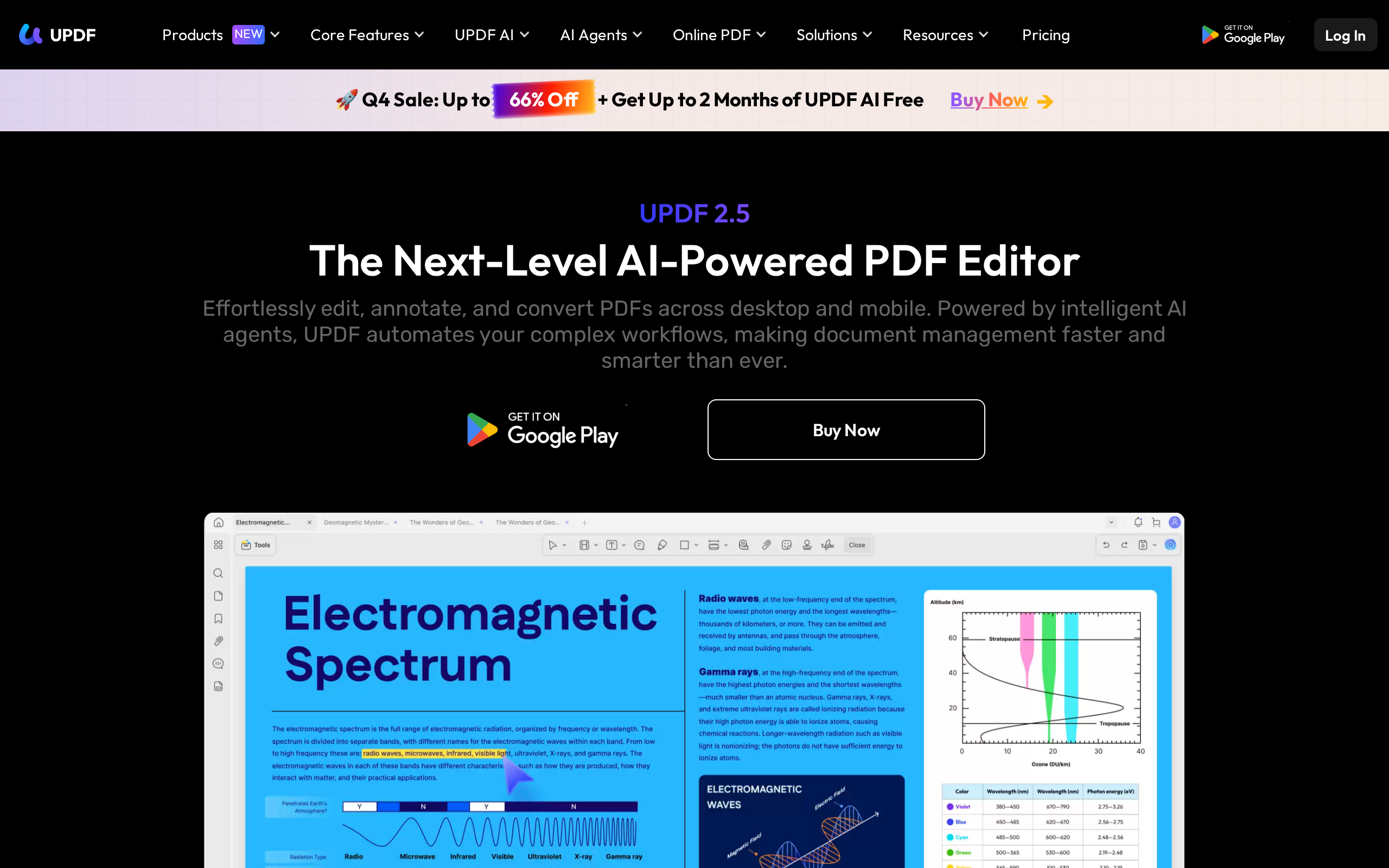
The PDF-specific controls extend beyond markup. UPDF can merge or split pages. It can compress, extract, crop, or replace pages. Its comparison feature marks differences automatically. It compares paired PDF files. Its conversion options include Word and Excel. They also include PPT, images, HTML, or text. That scope matters because a review often ends with a corrected PDF. It may instead produce a clean export or a version check, not a request for software to infer the next business step.
Yingxun Batch Processing Tool serves a different fixed-operation need. appinn describes PDF-to-Word and CAD-to-PDF conversions. It also describes dox-to-docx or PDF-to-html conversions. Other functions include bulk keyword changes and image replacement. The tool can insert or delete pages. It can perform extraction, document generation, or watermark removal or addition. The tool can accept hundreds or thousands of files for conversion or processing at once, according to appinn. That makes it suited to repeated, specified edits across a large file set, where consistency is more useful than broad document judgment.
Make an agent earn its permissions
WorkBuddy separates advice from action through Ask, Plan, and Craft modes. According to woshipm, Ask can view files and answer questions, but it does not modify anything on the computer. It also omits some tools associated with execution and editing.
Plan mode makes the intended work inspectable before it begins. WorkBuddy can identify the files it would read, the modifications it would make, the steps involved, methods for validating the result, and risks. It can view files in this mode, yet produces that detailed plan before making changes. This creates a practical permission ladder: understand the request first, examine the proposed operation next, then permit direct work only when the plan is acceptable.
Craft is the mode for execution. woshipm says it can operate files directly, organize folders, generate documents, create PowerPoint presentations, and process spreadsheets.
Its workspace design adds another boundary. A selected working directory is the default place for reading source files and saving generated files. If a task starts without a specified folder, WorkBuddy creates a new folder as that task's default environment. Each conversation is treated as an independent task with its own workspace, which can keep a request tied to a defined area rather than an undifferentiated desktop.
The tension appears in WorkBuddy's permission tiers. It has default permissions and full access; full access permits access to all resource files and network operations on the user's computer, according to woshipm. That broader setting may remove friction for a task that crosses folders or needs network operations. But it also changes the decision from approving a planned job in a task space to granting a much wider operating boundary. The agent earns that boundary when the work actually requires it.
Choose by autonomy, scale, and where files can go
- You need to edit, annotate, sign, compare, convert, or OCR individual PDF documents, with synchronization across devices. Use UPDF. It combines PDF editing, conversion, annotation, OCR, form signing, document comparison, AI summarization, translation, and cloud synchronization among computers, tablets, and mobile phones.
- You need repeatable transformations across hundreds or thousands of files and do not want files uploaded to a server. Use Yingxun Batch Processing Tool. It supports batch processing across its integrated tool categories, can add hundreds or thousands of files at once, and claims to process files locally without an internet connection or server upload.
- You want an agent to organize folders, generate documents or presentations, process spreadsheets, or coordinate a multi-step desktop task. Use WorkBuddy in its default Craft mode when direct file operation is acceptable. Its stated capabilities include organizing folders, generating documents, creating PowerPoint presentations, and processing spreadsheets.
- A task may involve consequential changes and you need to inspect proposed actions before execution. Use WorkBuddy's Plan mode rather than direct execution. It can list files to read, modifications to make, steps to complete, result-validation methods, and risks before execution.
- You only need answers based on files and do not want the assistant to modify the computer. Use WorkBuddy's Ask mode. The sources describe it as able to view files and answer questions without modifying anything on the computer.
Preview first, then promote proven jobs
Start WorkBuddy in Plan mode before allowing changes. According to woshipm, the plan can name the files to read, proposed modifications, steps to complete, ways to validate the result, and risks. That makes the plan a reviewable work order rather than a vague request. Compare the finished state against those validation methods before promoting the job into automation.
For PDF revisions, use UPDF's comparison view as the checkpoint. iplaysoft says it can compare two PDF files and automatically mark their differences.
Reserve unattended runs for jobs that have already proved repeatable. WorkBuddy tasks need a prompt and a schedule. They also need skills and connectors. They will not run unless the computer is powered on. It must be online and have WorkBuddy open. Results can return in conversations or be sent to a WeChat Mini Program or WeCom. For large, defined transformations, appinn describes Yingxun Batch Processing Tool as able to add hundreds or thousands of files for processing, including keyword changes, image replacement, page operations, and watermark removal.
Keep the installed skill set narrow enough to inspect. woshipm describes more than 20 built-in WorkBuddy skill packages, compatibility with tens of thousands of OpenClaw community skills, and natural-language creation of new skills. That range can be useful, but each added option makes choosing the right tool less certain. Promote only the skills attached to proven jobs.
Put repeatable conversion and cleanup jobs in a local batch queue rather than handling each file individually. Yingxun Batch Processing Tool accepts Txt and html. It also accepts md alongside jpg, png, bmp and gif. The tool supports webp and psf, according to appinn. Its listed operations include PDF-to-Word, CAD-to-PDF, dox-to-docx and PDF-to-html, plus keyword deletion, watermark removal, page extraction and image cropping. Make a dedicated input folder and check output before processing the full set.
Use it where local handling matters. appinn says files are processed without an internet connection or server upload, and claims hundreds or thousands can be added at once. Treat its 10-times efficiency claim as a prompt to measure your own run, not a guarantee.
For readers outside China
- Availability: UPDF is available on Windows, macOS, iOS, Android, and the web. WorkBuddy provides Windows and Mac installation options and supports WeChat login. Yingxun Batch Processing Tool's supported operating systems are not disclosed in sources. Availability outside China is not disclosed in sources.
- Pricing: Yingxun Batch Processing Tool is described as free to use. Pricing for UPDF and WorkBuddy is not disclosed in sources.
- Closest Western equivalents: The source material does not identify Western equivalents for UPDF, Yingxun Batch Processing Tool, or WorkBuddy.
- Data residency: Yingxun Batch Processing Tool claims to process files locally, without an internet connection or uploading file data to a server. UPDF has a cloud service that synchronizes files among devices, but the sources do not say where data is stored or processed. WorkBuddy can receive remote instructions through WeChat, WeCom, QQ, Feishu, and DingTalk; its full-access tier can access all resource files and network operations on the user's computer. The sources do not disclose WorkBuddy's data-residency practices.
Sources
- woshipm 3万字长文带你WorkBuddy 从入门到精通 https://woshipm.com/ai/6445745.html
- iplaysoft UPDF:AI 加持的全能 PDF 编辑器 (用过才知为啥大家都超级推荐!功能超全) https://iplaysoft.com/updf-editor.html
- appinn 压箱底办公神器:一键搞定Word、Excel、PDF、PPT、图片的批处理工具,效率翻倍! https://appinn.com/inxunoffice-word-excel-pdf-ppt
- woshipm WorkBuddy 踩坑 3 个月后,我总结了 12 个真正好用的使用技巧 https://woshipm.com/ai/6466314.html
The evidence: 47 facts from 4 Chinese articles
Each line below was extracted from the article it sits under, in Chinese, before any of this was written. The writing is done from these and never from the source prose - that separation is structural, not a promise. How we work.
appinn压箱底办公神器:一键搞定Word、Excel、PDF、PPT、图片的批处理工具,效率翻倍!
- Yingxun Batch Processing Tool (鹰迅批量处理工具) can be used without logging in or registering after installation.
- Yingxun Batch Processing Toolbox integrates nine categories of tools, including Word, Excel, PPT, PDF, text-file and image tools.
- Yingxun Batch Processing Tool supports Word formats including doc, docx and rtf.
- Yingxun Batch Processing Tool supports Excel formats including xls, xlsx, csv, xlsm, xltm, xltx and xlam.
- Yingxun Batch Processing Tool supports PPT formats including ppt, pptx, pps and pptm.
- Yingxun Batch Processing Tool supports standard PDFs and scanned PDFs.
- Yingxun Batch Processing Tool supports text-file formats including Txt, html and md, and image formats including jpg, png, bmp, gif, webp and psf.
- Yingxun Batch Processing Tool can perform format conversions including PDF-to-Word, CAD-to-PDF, dox-to-docx and PDF-to-html conversion.
- Yingxun Batch Processing Tool can batch modify or delete keywords, replace images, generate documents, insert or delete specified pages, extract document images, pages or specified content, and add or remove watermarks.
- Yingxun Batch Processing Tool can batch crop, compress, rotate and erase specified areas in images.
iplaysoftUPDF:AI 加持的全能 PDF 编辑器 (用过才知为啥大家都超级推荐!功能超全)
- UPDF is an AI PDF editor and reader available on Windows, macOS, iOS, Android, and the web.
- UPDF combines PDF editing, format conversion, annotation, OCR, form signing, document comparison, AI summarization, and translation.
- UPDF can directly edit text, images, links, backgrounds, and watermarks in PDF files.
- UPDF's AI editing tools can perform grammar checks, polishing, rewriting, expansion, shortening, tone adjustment, and full-document table-of-contents generation on selected text.
- UPDF supports highlights, underlines, handwritten signatures, sticky-note comments, and shape annotations.
- UPDF can convert PDFs to Word, Excel, PPT, images, HTML, and text formats.
- UPDF includes AI OCR technology that can convert image PDFs or scanned documents into editable text.
- UPDF provides page-management functions including merging, splitting, compressing, extracting, cropping, and replacing pages.
- UPDF includes an intelligent invoice assistant that automatically categorizes and organizes receipts.
- UPDF supports document encryption, privacy redaction, digital signatures, and form filling.
- UPDF can compare two PDF files and automatically mark differences between them.
- UPDF's cloud service automatically synchronizes files among computers, tablets, and mobile phones.
- UPDF AI can generate summaries and key-point analyses after a PDF is uploaded.
- UPDF supports full-text, selected-text, screenshot, and page-by-page translation modes.
- UPDF can use AI to extract core PDF content and generate mind maps.
woshipmWorkBuddy 踩坑 3 个月后,我总结了 12 个真正好用的使用技巧
- WorkBuddy has three modes: Plan mode, Ask mode, and Agent mode.
- WorkBuddy uses Agent mode by default.
- Plan mode can have WorkBuddy list files to read, modifications to make, steps to complete, result-validation methods, and risks before execution.
- WorkBuddy separates sidebar conversation management into tasks and spaces.
- Tasks within the same WorkBuddy space share all files in that space but have independent conversation contexts.
- WorkBuddy provides a /compact command that compresses earlier conversation content into summaries to free context space for later tasks.
- WorkBuddy has two permission tiers: default permissions and full access.
- WorkBuddy personalization settings include forms of address, response tone, presentation style, and custom instructions that apply to all conversations.
- WorkBuddy's global memory file is located at ~/.workbuddy/memory/MEMORY.md.
- A WorkBuddy project's rules file is located at project directory/.workbuddy/memory/MEMORY.md under the project root directory.
- WorkBuddy automation tasks require a prompt, an execution schedule, and skills and connectors.
- Results from WorkBuddy automation tasks can appear in conversations or be pushed to a WeChat Mini Program or WeCom.
- WorkBuddy automation tasks cannot execute unless the computer is powered on, connected to the internet, and has WorkBuddy open.
woshipm3万字长文带你WorkBuddy 从入门到精通
- WorkBuddy provides Windows and Mac installation options.
- On Mac computers with M-series processors, including M1 and M2 or later, WorkBuddy users should select the "Mac ARM64" download.
- On older Mac computers with Intel processors, WorkBuddy users should select the "Mac X64" download.
- WorkBuddy supports WeChat login.
- WorkBuddy provides three work modes: Ask, Craft, and Plan.
- Craft is WorkBuddy's default mode.
- WorkBuddy includes multiple AI models that users can switch between for different tasks.
- The AI models listed for WorkBuddy are MiniMax M2.5, Zhipu GLM-5, Kimi K2.5, and DeepSeek V3.2.
- The WorkBuddy assistant page uses a dedicated folder named "Claw" as its fixed workspace.