Local file retrieval starts before search. If one physical hard drive stays one drive letter, there is less to guess later, and a single administrator account keeps the machine's identity from splitting into extra paths.
That same logic reaches the first login. According to sspai, using ms-cxh:localonly or oobe\\BypassNRO can skip Microsoft account sign-in and create a local user directly, while a direct Microsoft login makes the default username the first five characters of the account name. The author also prefers lowercase English letters for usernames, and names the device as "nickname or company name - model abbreviation," so filenames do not get garbled and folders stay predictable. That is the pattern this piece will trace: retrieval speed depends on structure first, then on whatever indexer or AI tool has to work inside it.
Start with folder layout, not search
Folder layout is the first retrieval layer. According to sspai, keeping one physical hard drive as one drive letter avoids the friction that comes from splitting storage into partitions, and the same article says a single administrator account keeps the machine's identity simpler. That matters before any search tool opens.
The setup details shape where files land later. sspai says the commands `ms-cxh:localonly` and `oobe\BypassNRO` can skip Microsoft account sign-in and create a local user directly, while a direct Microsoft account sign-in makes the default username the first five characters of that account name. The author also prefers device names in the form "nickname or company name - model abbreviation" and recommends lowercase English letters for usernames to avoid garbled filenames from encoding errors later. A predictable name is easier to type, easier to sync, and easier to script.
Storage size affects how much structure you need. sspai recommends not partitioning drives on devices with 512G or less, and considering partitioning only on devices with 1T or more. That keeps smaller machines from turning into a maze of separate volumes. For local tools, the difference is practical: VS Code's User Installer goes under `C:\Users\%USERNAME%\AppData\Local\Programs` or `%LOCALAPPDATA%\Programs`, while the System Installer goes under `C:\Program Files`. The path tells you where the program lives, and a stable folder rule tells you where your own files should live.
Shared folders also depend on naming discipline. sspai recommends using the default Downloads folder as a shared SMB folder and disabling the default administrative shares `C$`, `D$`, `E$`, `ADMIN$`, and `IPC$` through registry changes. That pushes file access toward places people can actually recognize. Less surprise in the folder tree means less time wasted before search even begins.
What a launcher like Listary or SwiftList is actually doing
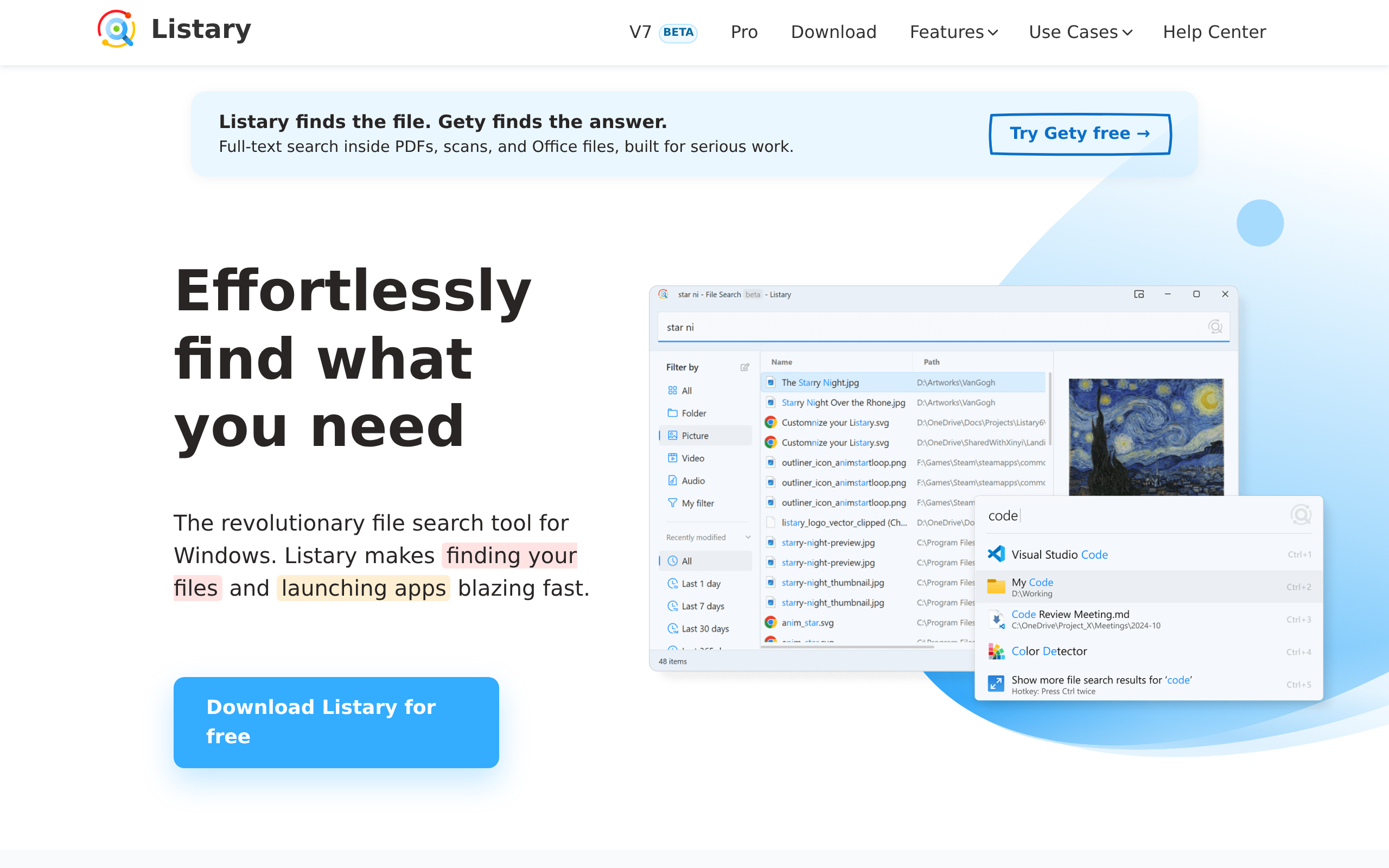
Listary-style tools sit between the user and the folder tree. According to appinn, Listary users can press Ctrl twice to search files, open programs, jump to folders, and locate directories directly in Open File and Save File dialogs. That matters because the tool is not replacing the filesystem; it is giving you a faster way to reach it.
Listary is said to solve a very plain problem: finding a folder without opening a search page, saving a file without clicking through dozens of directory levels, and opening a program without moving the mouse to the Start menu. Those are different actions, but they share the same role. The launcher becomes the shortcut layer above Windows dialogs and folders.
SwiftList is being framed as a similar layer with a different packaging. Appinn describes it as an open-source alternative to Listary, a high-performance and extensible Windows search system, and a fast, lightweight tool with a powerful alias and plugin ecosystem. Its project page is hosted on GitHub, and it aims to reproduce Listary's global launcher, file location, and Windows file-window enhancement experience.
That design tells you what these tools can and cannot fix. They can make jumping into a file, folder, or dialog feel immediate. They can also inherit the mess underneath. If folder names are inconsistent, or files live in unpredictable places, a launcher still has to surface the right target from that structure.
SwiftList also claims it can search millions of local files in seconds. Even if that claim holds, the tool is still working against the shape of the local library you give it. Listary V7 Beta recently added proactive recommendations, a new preview panel, new theme colors, and a new engine, which shows how much of the user experience lives above raw lookup speed.
That is why launcher tools matter in a local-file workflow. They reduce friction at the point of entry, but they do not replace folder rules or a sensible location scheme. They are the bridge, not the map.
How the three sources frame local-file retrieval
| Dimension | appinn: SwiftList / Listary | sspai: Windows setup and storage conventions | woshipm: Local-file indexing workflow |
|---|---|---|---|
| Core problem | Finding files, folders, programs, and Windows file-dialog targets quickly | Keeping Windows setups, usernames, and storage layouts stable and predictable | AI tools becoming very slow when they need to search tens of thousands of local files by traversing folders one by one |
| Primary approach | A high-performance, extensible Windows search system with alias and plugin ecosystem | Conventions during setup: one drive letter per physical disk, one administrator account, offline setup choices, and predictable naming | A 3-file indexing system built around scanning once and storing metadata in SQLite |
| Indexing / retrieval model | Global launcher and file-location experience; aims to reproduce Listary and part of Everything's capabilities | Not covered | Uses os.walk() to scan a directory once and store filenames, paths, sizes, and timestamps in a SQLite database |
| Tools or products mentioned as benchmarks | Listary, Everything, SwiftList | VS Code, NanaZip, Windows native RAR and 7Z support | Obsidian, Logseq, DocGraph, Cortex, Graphify, VS Code MCP |
| Speed / scale claim | SwiftList claims to search millions of local files in seconds | Not covered | The author says the indexing system lets AI find files in seconds |
| View on existing software | SwiftList is presented as an open-source alternative to Listary; the writer says Listary's current user experience and attention to detail are not something just any open-source project can match | Not covered | The author checked existing solutions first and found Obsidian and Logseq too heavy, DocGraph closest, Cortex costly, and Graphify ineffective for documents |
| File-organization stance | Not covered | Keep one physical hard drive as one drive letter, avoid partitions if possible, and use lowercase English letters for usernames to avoid garbled filenames later | Build a stable local index from folder contents rather than rely on brute-force browsing |
| How AI fits in | Not covered | Not covered | AI queries work best after indexing; the author abandoned MCP integration after VS Code's MCP configuration changed through three versions |
Why AI file lookup slows down on messy local storage
AI file lookup slows down when the model is asked to walk a filesystem directly. According to woshipm, the author says that searching tens of thousands of local files by traversing folders one by one becomes very slow, and his own E drive holds more than 90,000 files. The point is simple: the bottleneck is not the model's language ability. It is the act of scanning a messy tree on demand.
He did not jump straight to code. He first checked existing solutions, then ruled out Obsidian's bidirectional links, Zettelkasten, and Logseq's block references because they were too heavy for his needs. DocGraph came closest, since it supports 40+ file formats, offline embedding, and an MCP interface for direct AI queries, but installation failed because of the better-sqlite3 build dependency. Cortex was a poor fit because it requires ongoing API fees. Graphify was not designed for this use case either, even with 55,000 GitHub stars, because it focuses on code AST parsing and does not provide an MCP query interface.
That search history points to the real requirement. If the files are scattered and the tool still has to inspect folders on demand, AI becomes a slow browser over local storage. The author says he spent one day building a 3-file indexing system, and that system lets AI find files in seconds. He also tried MCP integration, then abandoned it after VS Code's MCP configuration changed through three versions. The lesson is not that AI is weak. It is that retrieval needs a fast local index before the model can be useful.
When to use a launcher, when to use an index, and when not to force AI over a messy filesystem
- You mainly need to jump to files, folders, or app launches quickly in Windows, especially from Open File / Save File dialogs. Use a launcher-style tool like Listary, or SwiftList if you want an open-source alternative. The ledger says Listary lets you press Ctrl twice to search files, open programs, jump to folders, and locate directories directly in dialogs, while SwiftList aims to reproduce that experience and adds a plugin-based launcher.
- You want the Listary-style workflow but prefer open source and extensibility. Try SwiftList first. The sources describe it as an open-source, high-performance, extensible Windows search system, with alias and plugin support. Do not expect the same polish as Listary; the writer explicitly says that current Listary UX and attention to detail are not something just any open-source project can match.
- Your problem is not "search" in the abstract, but AI or scripts being too slow when they have to traverse tens of thousands of local files. Build or adopt an index-backed retrieval layer instead of asking AI to browse folders on demand. The article on woshipm says AI tools get very slow when they must search tens of thousands of files one by one, and the author's SQLite-based index let AI find files in seconds.
- You need a minimal, local, scriptable retrieval system rather than a full note app or heavyweight knowledge system. A small custom indexer is a good fit. The ledger says the author's approach uses os.walk() once, stores filenames, paths, sizes, and timestamps in SQLite, and the final setup is only three files: find.py, file-index.db, and 卸载指南.md.
- You are tempted to force document-graph or AI tooling onto ordinary local files, but the setup feels heavy or fragile. Be selective. The author said Obsidian's bidirectional links, Zettelkasten, and Logseq's block references were too heavy, and DocGraph was the closest fit because it supports 40+ file formats, offline embedding, and an MCP interface. However, DocGraph also failed to install because of the better-sqlite3 build dependency, and Cortex was rejected because it needs ongoing API fees.
How a lightweight SQLite index changes the workflow
Woshipm's author argues that the real payoff of a custom index is not flashy search, but getting AI to find local files in seconds. His setup scans a directory once with `os.walk()`, then stores filenames, paths, sizes, and timestamps in a SQLite database. That changes the workflow from repeated disk crawling to a prebuilt lookup layer.
The first scan indexed 790 files and 156 directories and took more than ten seconds. That is the tradeoff: you spend time up front so later queries are cheap. A lightweight index also keeps the moving parts visible, because the author's final setup contains three files: `find.py`, `file-index.db`, and `卸载指南.md`.
That simplicity comes with limits. The script uses only Python standard-library modules, including `sqlite3`, `os`, `sys`, and `datetime`, so the dependency surface stays small. But when the author tried MCP integration, he abandoned it after VS Code's MCP configuration changed through three versions. A prebuilt app can cover more file types and query paths, but it also ties you to its install path, its embedding model, and, sometimes, a build dependency that blocks setup. Woshipm says DocGraph came closest to what he wanted because it supports 40+ file formats, offline embedding, and an MCP interface for direct AI queries, yet it still failed to install because of `better-sqlite3`.
If your local file work is still tied to brute-force browsing, start by fixing the folder rules and the index path. The author's own switch to a one-time scan with `os.walk()` is the clue.
That scan stored filenames, paths, sizes, and timestamps in SQLite, then became a tiny setup with `find.py`, `file-index.db`, and `卸载指南.md`. It covered 790 files across 156 directories and took more than ten seconds on the first pass. The next thing to watch is tool fit: DocGraph failed on a `better-sqlite3` build dependency, Cortex adds ongoing API fees, and Graphify's 55,000 GitHub stars did not help document search because it lacks an MCP query interface. The practical test is simple: if your model cannot query a fast local index, fix the index before asking for AI retrieval.
For readers outside China
- Availability: SwiftList has a project page hosted on GitHub, so its source is publicly reachable from the ledger. Listary, DocGraph, Cortex, Graphify, Obsidian, and Logseq are mentioned in the sources, but their availability outside China is not disclosed in sources.
- Pricing: No pricing is disclosed for SwiftList, Listary, DocGraph, Graphify, Obsidian, or Logseq in the ledger. Cortex is the only tool explicitly described as requiring ongoing API fees.
- Closest Western equivalents: Listary; Everything; Obsidian; Logseq; DocGraph
- Data residency: The safest local-first option in the ledger is the custom SQLite indexer, which stores metadata locally in file-index.db. DocGraph is described as supporting offline embedding. For Cortex, the ledger only says it needs ongoing API fees, so data residency is not disclosed in sources.
Sources
- appinn 嫌 Listary 很久不更新,搞了个开源替代品:SwiftList https://appinn.com/swiftlist
- sspai 让 Windows 顺眼又省心:我的新设备配置经验 https://sspai.com/post/111300
- woshipm AI 找文件太慢?不是你该换工具,是你该建索引 https://woshipm.com/share/6433847.html
The evidence: 31 facts from 3 Chinese articles
Each line below was extracted from the article it sits under, in Chinese, before any of this was written. The writing is done from these and never from the source prose - that separation is structural, not a promise. How we work.
appinn嫌 Listary 很久不更新,搞了个开源替代品:SwiftList
- SwiftList is presented as an open-source alternative to Listary.
- SwiftList is described as a high-performance, extensible Windows search system.
- SwiftList is described as fast, lightweight, and supportive of a powerful alias and plugin ecosystem.
- SwiftList aims to reproduce Listary's global launcher, file location, and Windows file-window enhancement experience.
- SwiftList is positioned as an open-source version of Listary with part of Everything's capabilities plus a plugin-based launcher.
- Listary users can press Ctrl twice to search files, open programs, jump to folders, and locate directories directly in Open File and Save File dialogs.
- Listary is said to solve the need to find a folder without opening a search page.
- Listary is said to solve the need to save a file without clicking through dozens of directory levels.
- Listary is said to solve the need to open a program without moving the mouse to the Start menu.
- Listary V7 Beta recently added proactive recommendations, a new preview panel, new theme colors, and a new engine.
- SwiftList's project page is hosted on GitHub.
- A user named godar54655 self-recommended SwiftList through the discovery channel.
sspai让 Windows 顺眼又省心:我的新设备配置经验
- Pressing Shirt + F10 during Windows OOBE opens a terminal, and some laptop users may also need to hold Fn to release the multimedia keys.
- The commands start ms-cxh:localonly and oobe\BypassNRO can skip Microsoft account sign-in and create a local user directly.
- If a user signs in with a Microsoft account directly, the default username becomes the first five characters of the Microsoft account name.
- If a Microsoft account is registered with a QQ email address, the default username may become five digits.
- For Windows 10, the author says that choosing "I don't have Internet" while offline leads directly to the user-creation flow.
- For VS Code, User Installer corresponds to C:\Users\%USERNAME%\AppData\Local\Programs or %LOCALAPPDATA%\Programs, while System Installer corresponds to C:\Program Files.
- Windows 11 has native right-click RAR and 7Z extraction support starting from 23H2.
woshipmAI 找文件太慢?不是你该换工具,是你该建索引
- The author says there are more than 90,000 files on his E drive.
- The author says he spent one day building a 3-file indexing system.
- The author says he first checked existing solutions instead of writing code immediately.
- The author says Obsidian's bidirectional links, Zettelkasten, and Logseq's block references were too heavy for his needs.
- The author says DocGraph is the closest existing solution to his needs because it supports 40+ file formats, offline embedding, and an MCP interface for direct AI queries.
- The author says DocGraph failed to install because of the better-sqlite3 build dependency.
- The author says Graphify has 55,000 GitHub stars, focuses on code AST parsing, and is ineffective for documents because it does not provide an MCP query interface.
- The author says his indexing approach uses os.walk() to scan a directory once and store filenames, paths, sizes, and timestamps in a SQLite database.
- The author says the first scan indexed 790 files and 156 directories and took more than ten seconds.
- The author says his final setup contains three files: find.py, file-index.db, and 卸载指南.md.
- The author says find.py uses only Python standard-library modules including sqlite3, os, sys, and datetime.
- The author says he tried MCP integration but abandoned it after VS Code's MCP configuration changed through three versions.